
Essential guide for affiliates
Bitget CFD zero-fee mode: Understanding the new affiliate rebate model
Beginner
2026-06-15 | 5m
Bitget offers one-stop trading for cryptocurrencies, stocks, and gold. Trade now!
A welcome pack worth 6200 USDT for new users! Sign up now!
To further enhance the trading experience and diversify affiliate earning opportunities, Bitget CFD has officially launched
zero-fee mode, a commission-free account mode designed for different trading preferences. This guide explains how zero-fee mode works, how it differs from ECN mode, how users can switch between modes, and how affiliate rebates are calculated under the new model.
Launch date:
Zero-fee mode officially launched on
June 8, 2026. Users can freely switch between ECN mode and zero-fee mode based on their trading preferences.
ECN mode and zero-fee mode overview
ECN mode: ECN mode is the platform's original account mode. It offers spreads that closely reflect raw market pricing and charges commissions based on the trading instrument and lot size. Affiliate rebate = commission × CFD rebate rate
Zero-fee mode: Zero-fee mode is a new feature introduced by Bitget CFD. Users do not pay trading commissions. Instead, trading costs are incorporated into a markup on the base spread, resulting in spreads that are slightly wider than those in standard ECN mode. Affiliate rebates are paid as a fixed USDT amount per lot traded.
| Mode | Fee structure | Best suited for | Features |
| ECN mode (existing) | Lower spreads + trading comissions | Short-term and high-frequency trading | Transparent spreads based on raw market quotes |
| Zero-fee mode (new) | Zero commissions + standard spreads | Medium- to long-term traders and low-frequency traders | Simpler transaction records with no commission charges |
Affiliate rebate differences between ECN mode and zero-fee mode
Both ECN mode and zero-fee mode generate affiliate rebates, but the rebate mechanisms differ. Under ECN mode, rebates are calculated based on commissions × rebate rate, while zero-fee mode pays rebates based on spreads. The differences are as follows:
|
|
ECN mode
|
Zero-fee mode
|
|
Rebate method
|
Commissions × rebate rate (40%–50%)
|
Fixed rebate per lot (USDT/lot)
|
|
Rebate amount
|
Commissions on CFD products are relatively low, resulting in lower rebate amounts after the rebate rate is applied
|
Fixed USDT/lot, resulting in higher rebate amounts
|
|
Predictability
|
Fixed percentage, easy to estimate
|
Fixed amount per lot, easy to estimate
|
|
Affiliate earning potential
|
Higher trading volume generates more commissions and higher rebates
|
Higher trading volume and higher rebate tiers generate higher rebates
|
Key advantages of zero-fee mode
Advantage 1: Higher rebate amounts
-
Under ECN mode, the gold commission is 6 USDT/lot × 50% rebate rate = 3 USDT/lot.
-
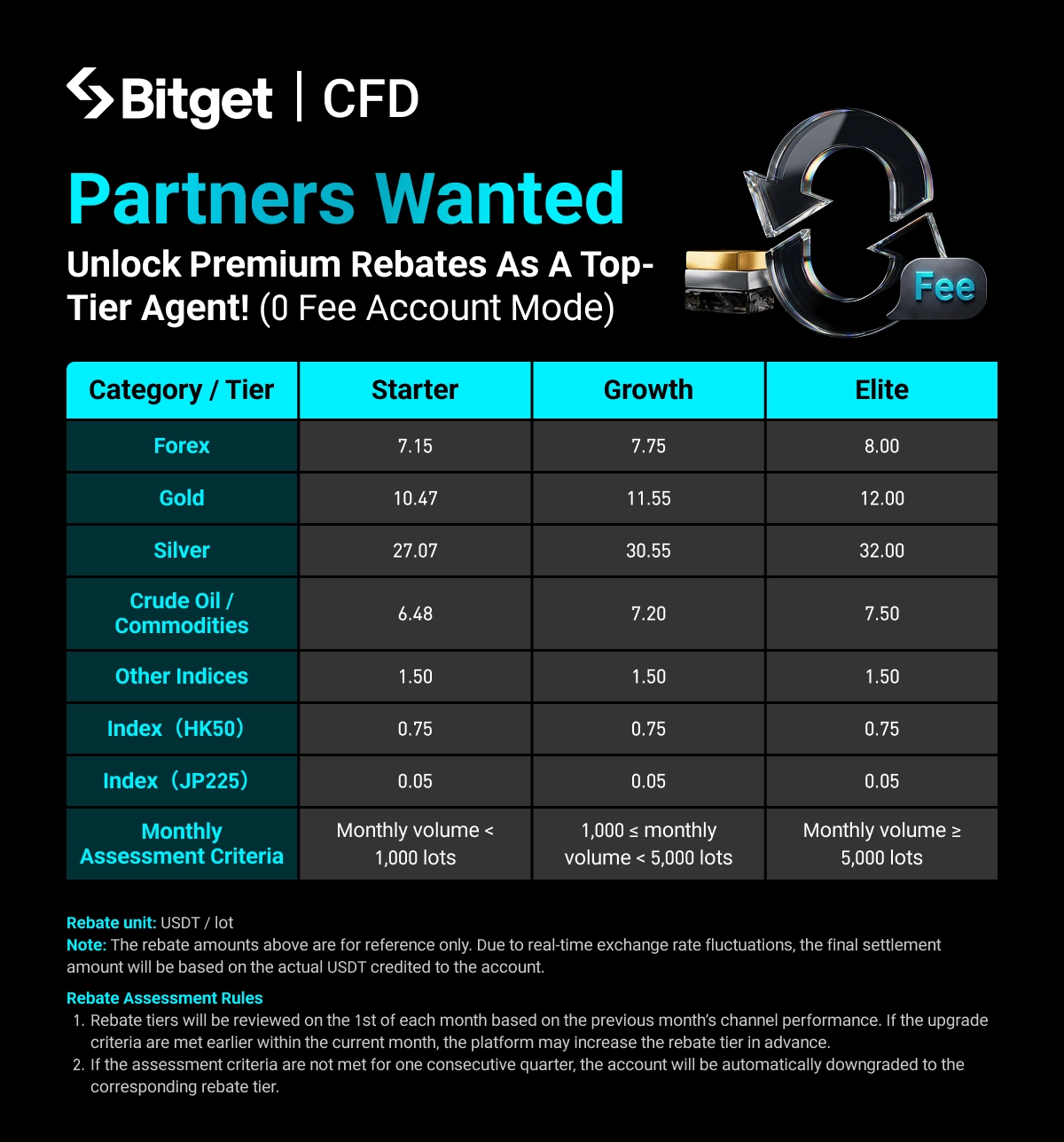
Under zero-fee mode, gold rebates are 10.47 USDT/lot for Junior, 11.55 USDT/lot for Intermediate, and 12.00 USDT/lot for Senior.
For the same 1-lot trade, rebates under zero-fee mode are approximately 3.5–4 times higher than those under ECN mode. The higher the rebate tier, the greater the difference.
Advantage 2: Aligned with industry standards and suitable for a wider range of clients
Zero-fee mode is the standard account model used across much of the CFD industry and is preferred by the majority of CFD traders. ECN mode will continue to serve professional traders. By offering both modes, Bitget can better meet different client needs.
Zero-fee mode rebate tiers
|
Tier
|
Monthly volume
|
Forex
|
Gold
|
Silver
|
Oil/Commodities
|
Other indices
|
HK50
|
JP225
|
|
🥉 Junior
|
Under 1000 lots
|
7.15
|
10.47
|
27.07
|
6.48
|
1.50
|
0.75
|
0.05
|
|
🥈 Intermediate
|
1000–5000 lots
|
7.75
|
11.55
|
30.55
|
7.20
|
1.50
|
0.75
|
0.05
|
|
🥇 Senior
|
≥ 5000 lots
|
8.00
|
12.00
|
32.00
|
7.50
|
1.50
|
0.75
|
0.05
|
Rebate assessment rules:
-
Upgrade rule: Within a calendar month, once an affiliate reaches the required trading volume for a higher tier, the rebate tier will be upgraded on the following day.
-
Downgrade rule: On the first day of each month, the platform will review the affiliate's CFD trading volume from the previous month. If the affiliate fails to meet the requirements of its current tier for an entire quarter, the rebate tier will be automatically adjusted according to the rules below.Current tierMonthly trading volume within the quarterAdjustment resultSeniorAt least one month ≥ 5000 lotsRemains SeniorSeniorAll three months < 5000 lots, but at least one month ≥ 1000 lotsDowngraded to IntermediateSeniorAll three months < 1000 lotsDowngraded to JuniorIntermediateAt least one month ≥ 1000 lotsRemains IntermediateIntermediateAll three months < 1000 lotsDowngraded to Junior
How to recommend the right account mode to your referred users
| User type | Trading style | Recommended account mode |
| Ultra short-term | High-frequency intraday trading with strong sensitivity to spreads | ECN mode |
| High-frequency EA traders | Automated high-frequency trading with strong sensitivity to spreads | ECN mode |
| Arbitrage traders | Multi-instrument arbitrage strategies that rely on tight spreads | ECN mode |
| Swing and long-term traders | Medium- to low-frequency trading with longer holding periods | Zero-fee mode |
| New users | Lower trading frequency and preference for simpler account statements | Zero-fee mode |
| Affiliates who also trade | Depends on individual trading preferences | Choose based on trading style |
Account mode rules
New users: Zero-fee mode is enabled by default for newly registered users, allowing them to enjoy commission-free trading immediately after registration.
Existing users: Your account will remain in ECN mode by default. Users who wish to experience commission-free trading can manually switch account modes in their account settings.
How can users switch account modes?
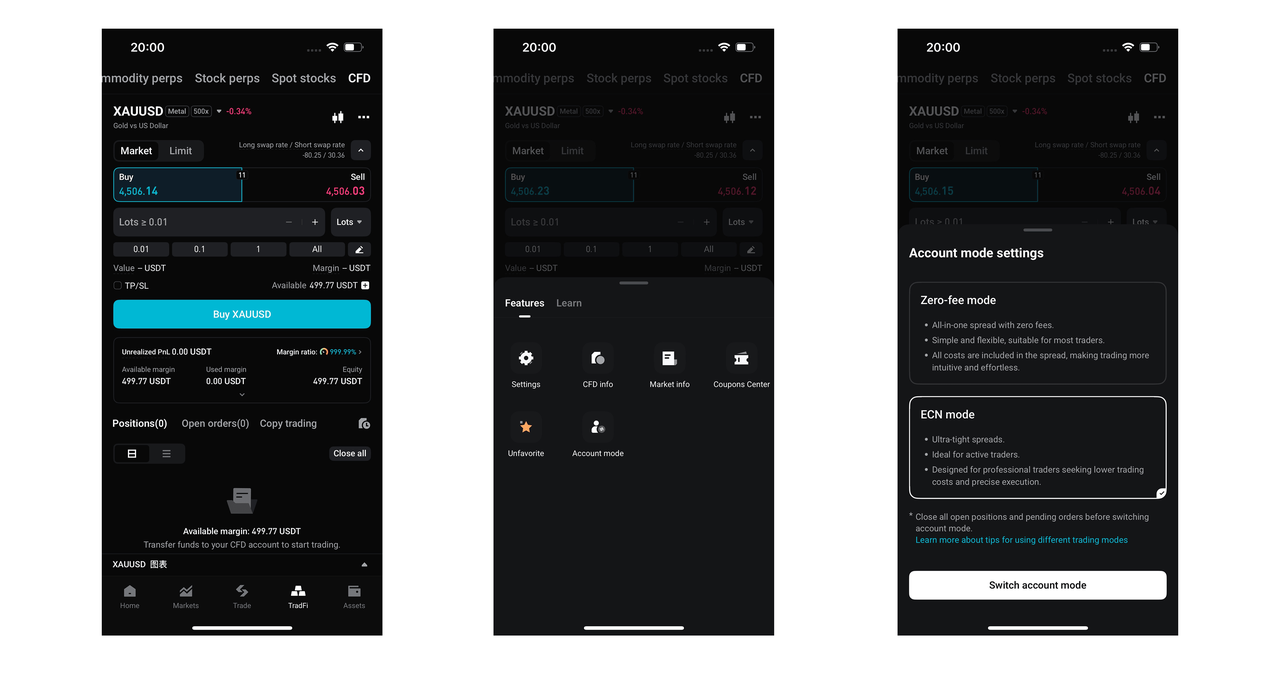
Switching entry
App: Bottom navigation bar「TradFi」→ tap「...」in the upper-right corner → tap「Account Mode」→ open the account mode switch window.
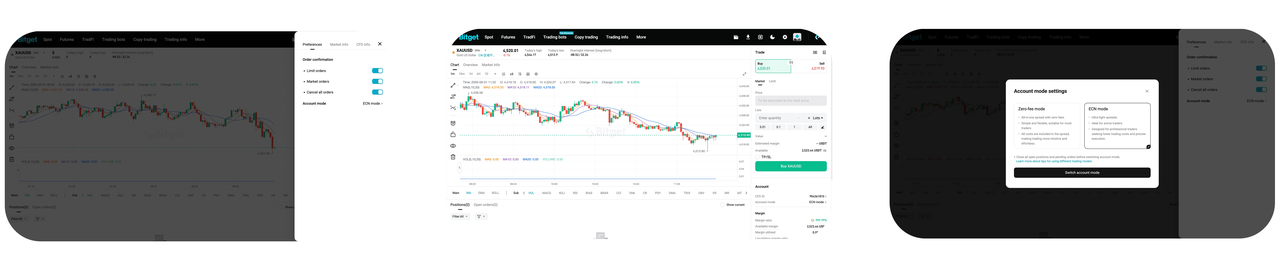
Website:
Account page or Preferences→ click 「Account Mode」→ open the account mode switch window.
Mode-switch verification
process
Before switching account modes, the system will perform the following checks.
If either check fails, the switch request will be rejected:
| Step | Check item | Failure scenario | Required action |
| Step 1 | Open order check | Unfilled orders exist | Cancel all open orders and try again |
| Step 2 | Position check | Active positions exist | Close all positions and try again |
Tip: Before switching account modes, check your open orders and positions to avoid switch failures caused by outstanding orders or active positions.
FAQ:
Q1: I understand the affiliate rebate per lot. What are the trading spreads for users?
-
User spreads vary by product category, as shown below.
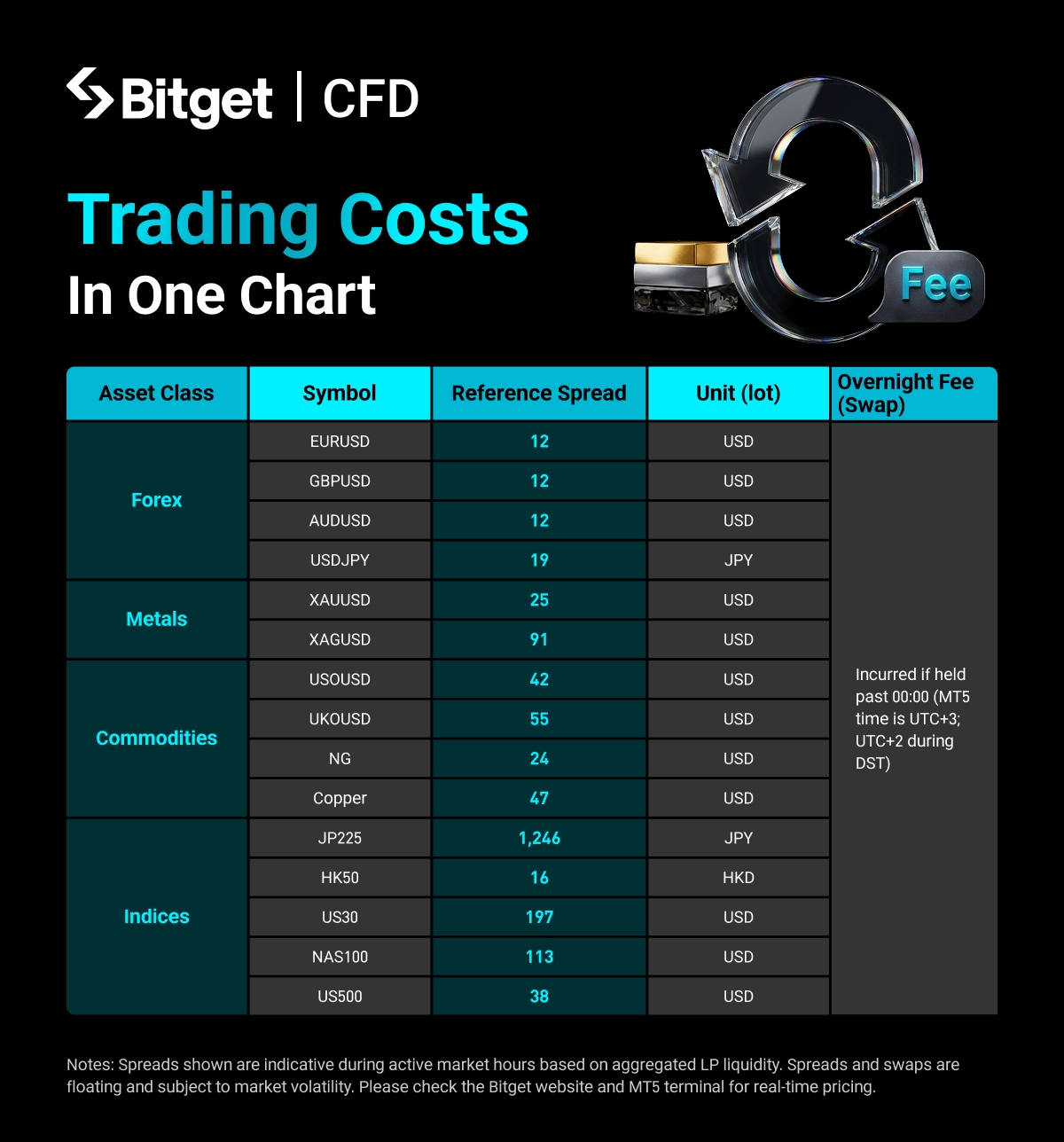 Figure 1: User trading spreads. This chart can be shared with users when they ask about spreads.------
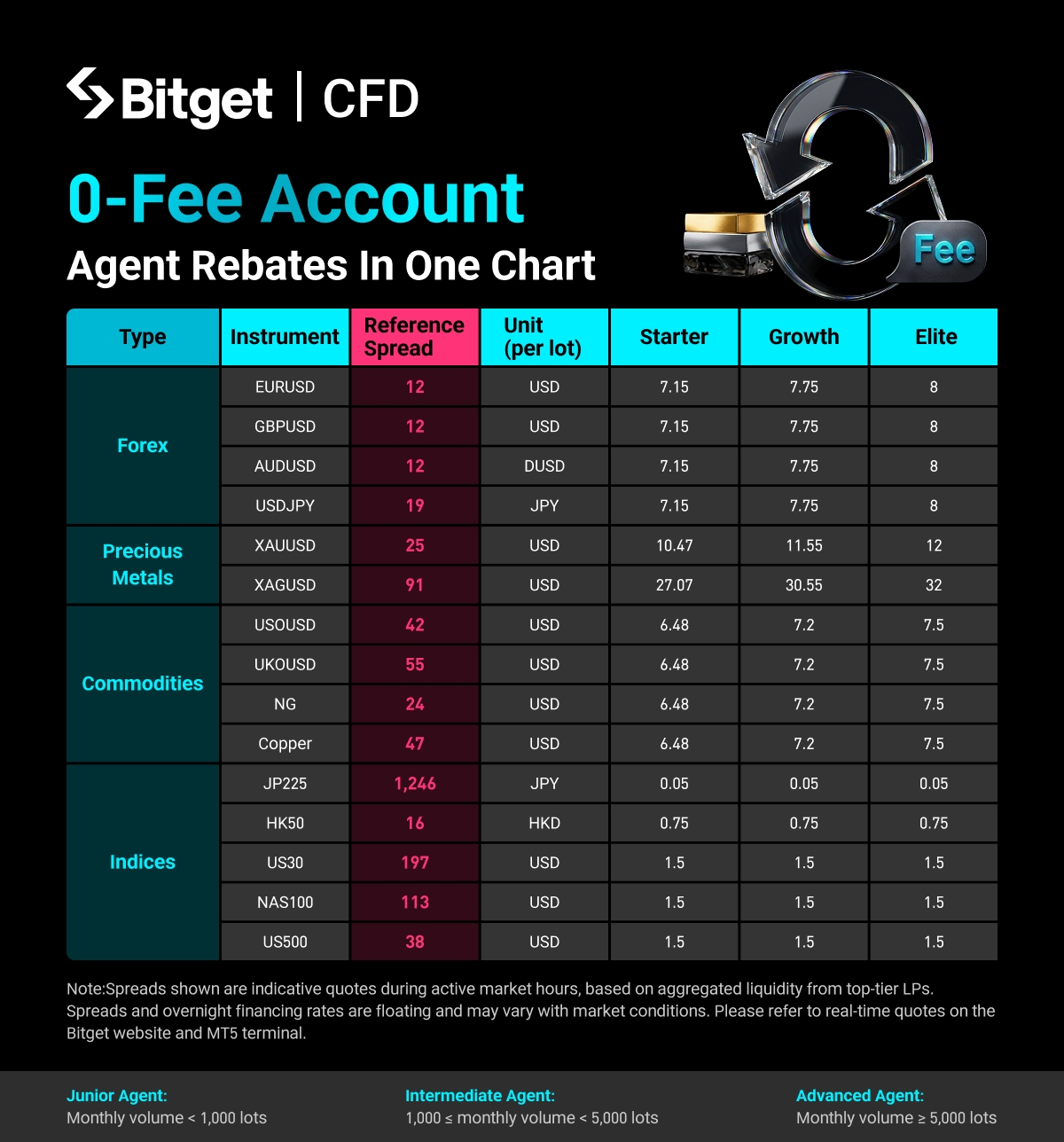 Figure 2: User trading spreads and affiliate rebates by tier. This chart is intended for affiliate reference.
Q2: Can you summarize which mode is suitable for which users in one sentence?
-
ECN mode = Tight spreads + trading commissions. Best suited for high-frequency traders and traders with larger capital.
-
Zero-fee mode = Wider spreads + zero trading commissions. Best suited for lower-frequency traders and traders with smaller capital.
Q3: I am a sub-affiliate. Can I receive rebates under zero-fee mode?
-
At present, sub-affiliates are not eligible for the additional rebates available under zero-fee mode. This feature will be gradually rolled out in the future. If a sub-affiliate's referred user selects zero-fee mode, the sub-affiliate will continue to receive rebates based on the ECN rebate structure. For example, if the sub-affiliate rebate rate under ECN mode is 30%, the sub-affiliate earns 1.8 USD per lot on gold trades. Under zero-fee mode, the sub-affiliate will continue to earn 1.8 USD per lot.
You should now have a clear understanding of Bitget CFD zero-fee mode, its key differences from ECN mode, the account mode switching process, and the affiliate rebate structure. Traders can choose the account mode that best matches their trading frequency, holding period, and cost preferences to enjoy a more efficient and transparent trading experience. Affiliates can recommend the most suitable account mode to their referred users while maximizing their earning potential. Trade smart with Bitget.
Join Bitget, the world's largest Universal Exchange (UEX).
Now you understand it, it is time to trade it!
Bitget offers one-stop trading for cryptocurrencies, stocks, and gold.
Trade now!Share


Content
- Launch date:
- ECN mode and zero-fee mode overview
- Affiliate rebate differences between ECN mode and zero-fee mode
- Key advantages of zero-fee mode
- Zero-fee mode rebate tiers
- How to recommend the right account mode to your referred users
- Account mode rules
- How can users switch account modes?
- FAQ:
How to buy BTCBitget lists BTC – Buy or sell BTC quickly on Bitget!
Trade nowWe offer all of your favorite coins!
Buy, hold, and sell popular cryptocurrencies such as BTC, ETH, SOL, DOGE, SHIB, PEPE, the list goes on. Register and trade to receive a 6200 USDT new user gift package!
Trade nowUp to 6200 USDT and LALIGA merch await new users!
Claim